Tasks
Track to-dos for candidates and your team in one place — so “call Anna back on Thursday” never gets lost in a notebook again.
Open Tasks
Click Tasks in the sidebar. The list shows every to-do with filters for All, Open and Done. Completed tasks stay visible with a strikethrough so you keep the full history.
Create a task
Click “Create Task” and describe what needs doing — e.g. “Call the candidate about availability”. Tasks can stand alone as general team to-dos or be linked to work on a specific candidate.
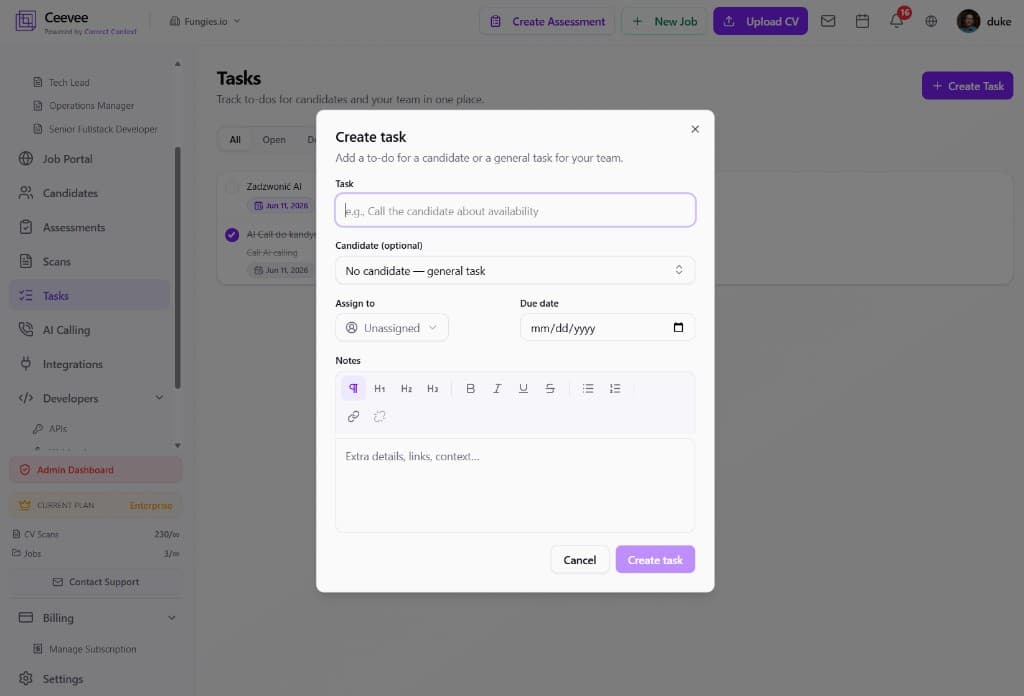
Link a candidate and assign an owner
Optionally pick a candidate so the task appears in their context, assign it to a teammate, and set a due date. Rich-text notes let you add links, formatting and extra context.
Track and complete
Tick the checkbox when a task is done. Due dates keep the team honest, and the Open filter gives everyone a clean “what’s next” view each morning.