AI CV Scanning
Ceevee’s AI scans uploaded CVs and builds rich candidate profiles automatically. No more manual data entry.
1
Upload a CV
Click "Upload CV" from the top bar. You can upload PDF files up to 10MB. The AI will process the document within seconds.
2
Review the AI Summary
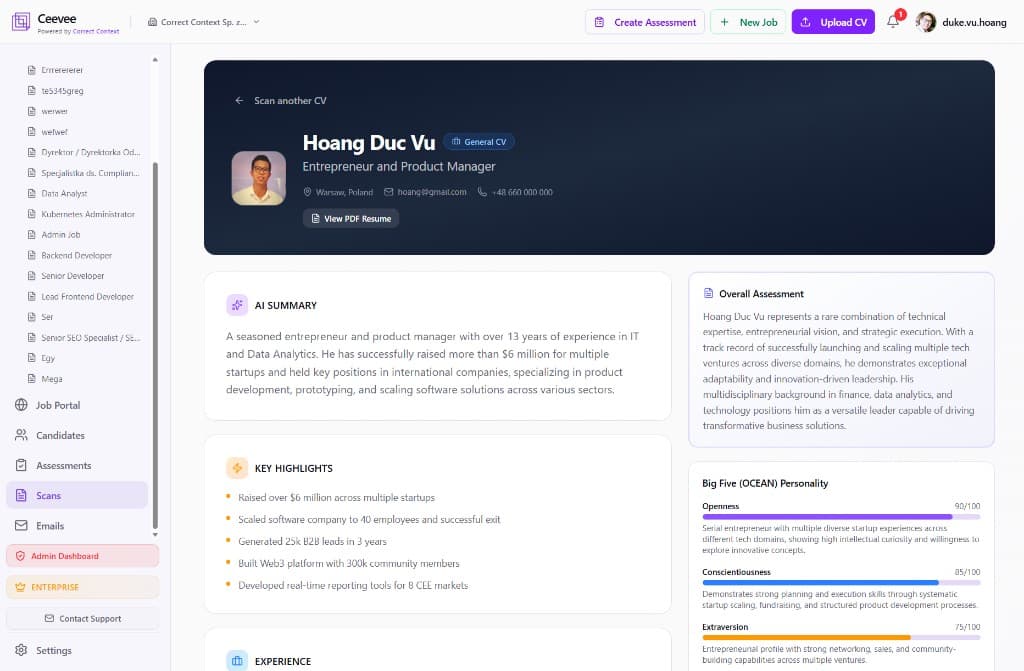
After scanning, Ceevee generates an AI Summary with key highlights, an overall assessment, and a Big Five (OCEAN) personality analysis based on the resume content.
3
Check extracted details
The profile page displays experience, education, skills, languages, work style traits, cultural values, and motivations — all extracted automatically from the CV.
4
View the PDF Resume
Click "View PDF Resume" to see the original uploaded document alongside the AI-generated profile.