Hiring Pipeline
Every job gets a visual Kanban pipeline. Drag candidates through stages, edit in bulk, and keep the whole hiring team aligned on where every candidate stands.
Open a job’s pipeline
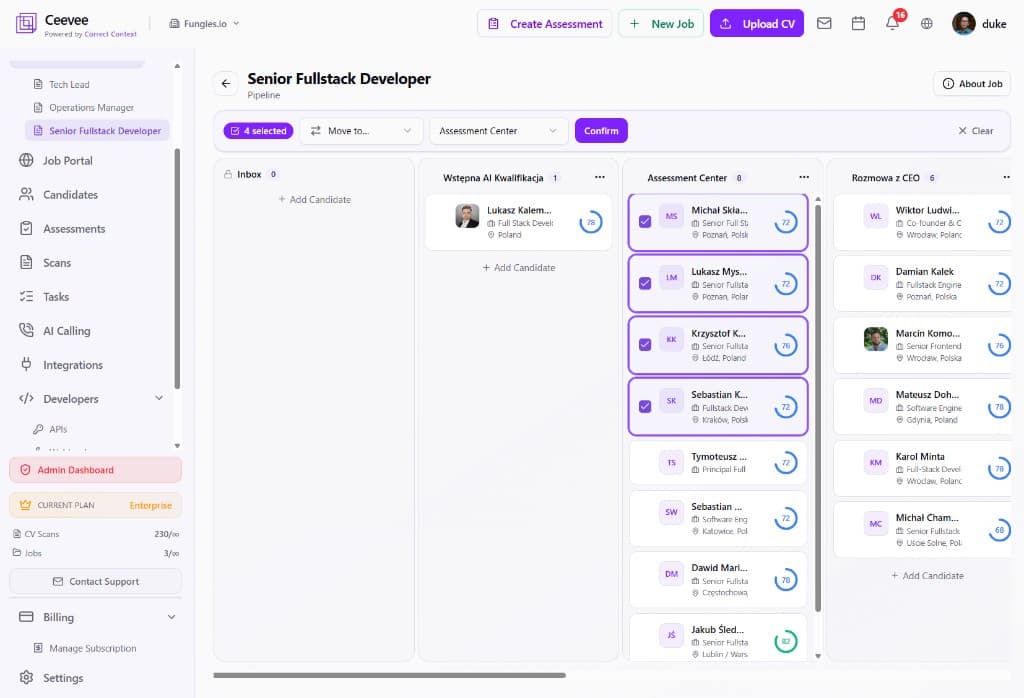
From the Jobs list, click a role and open its Pipeline. Candidates are organized into columns — Inbox, screening stages, interviews, offer — and you can rename or reorder stages to match your process.
Move candidates between stages
Drag and drop a candidate card to move them to the next stage. Each card shows the candidate’s name, role, location and their AI match score ring so you always have context.
Bulk-select and move candidates
Tick the checkboxes on multiple candidate cards (the toolbar shows how many are selected), pick a target stage in the “Move to…” dropdown and click Confirm. Whole groups move in one action — perfect after a screening round.
Add candidates directly to a stage
Use “+ Add Candidate” at the bottom of any column to drop an existing candidate (or a fresh CV upload) straight into that stage.
Keep the team in sync
Everyone with access to the job sees the same live board. Combined with match scores and assessment results, the pipeline becomes your single source of truth for every role.